Fleet Sales
Fleet Sales is the outbound prospecting pipeline. It is a separate workspace from your customer list: leads live here until they sign on, at which point they get converted into a Fleet customer with all the usual billing terms and service history. Find it under Fleet Sales in the sidebar.
This is where you track who you are chasing, what you have already tried, and what the next touch needs to be. The system runs a default 12-day cadence on every new lead so an opener email goes out automatically and the rest of the playbook (calls, texts, follow-up emails) shows up on your task list on the right day.
The kanban board
The landing page is a kanban board, one column per stage. Drag a card from one column to the next when the lead moves; the activity log records the transition and the cadence reschedules itself around the new stage.
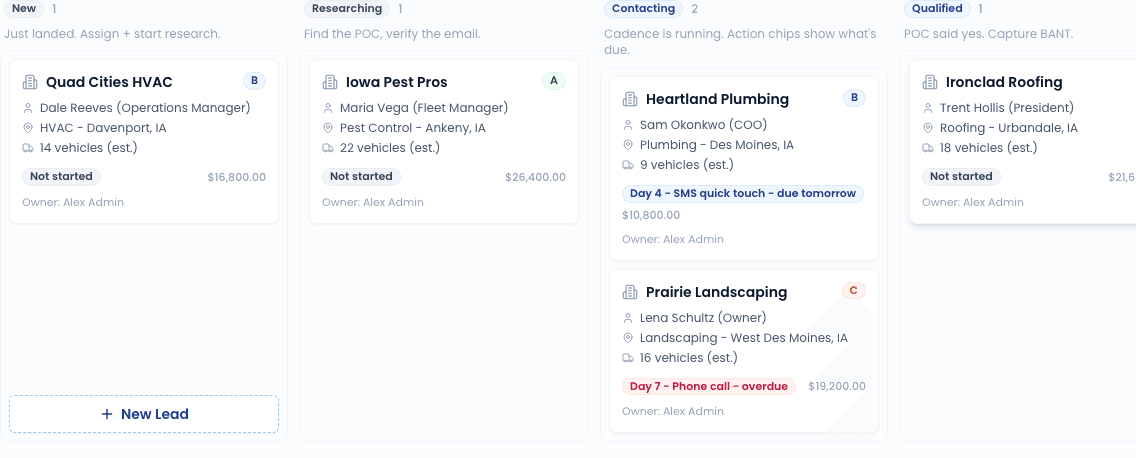
| Stage | What it means |
|---|---|
| New | Just landed. Assign an owner and start research. |
| Researching | You are hunting for the POC and verifying their email. |
| Contacting | Cadence is running. Action chips on each card show what is due today. |
| Qualified | POC engaged. Time to capture BANT (budget, authority, need, timing) on the detail page. |
| Meeting Booked | Onsite or virtual meeting on the calendar. |
| Proposal | Pricing in their hands; awaiting signature. |
| Won | Signed. Convert the lead to a Fleet account from the actions menu. |
| Cool-Off | Cadence finished without a yes. Auto-recycles after the cool-off period (default 180 days). |
| Lost | Disqualified or hard no. No auto-recycle. |
Each card shows the company, POC, lead score (A/B/C/D), and the next action with a colored chip when it is due today or overdue.
Adding a lead
There are two ways leads land in the pipeline:
- Manually - click New lead in the top-right of the board. Use this for cold targets you got off a gatekeeper call or a referral.
- From the embed widget - if you have the fleet-sales lead form embedded on your marketing site, every submission lands as a new lead in the New column.
Click "New lead"
Top-right of the Fleet Sales board.
Fill in what you have
Only Company name is required. Everything else (industry, city/state, POC name, email, phone, fleet size, estimated deal value) is optional and can be filled in later from the detail page. The industry field has a quick-pick popover (HVAC, Plumbing, Electrical, Pest Control, Landscaping, Moving, Cleaning, Construction, Roofing, Property Management, Delivery/Courier) but you can type anything.
Save
You land on the lead's detail page, where you can capture notes, log calls, and start the cadence.
The cadence does not start automatically when you create a lead. You start it from the detail page once you have a verified POC email - the opener email needs somewhere to send.
The detail page
Two-column layout:
- Left: Company + POC summary, BANT capture form, activity log.
- Right: Stage actions (start cadence, mark lost, convert to fleet account), score selector, follow-up date, assigned rep.
Lead score
Set A through D. Used to triage the board when you are looking at a packed column. A is hot (great fit, decision-maker engaged), D is cold (long shot but worth keeping warm). The score is purely a label - it does not change the cadence.
Activity log
Every email sent, call logged, stage change, score change, and note is appended to the activity log on the left. Use the Log a call and Add a note forms below the log to record manual touches that the cadence did not fire automatically.
Convert a won lead to a Fleet account
When the lead signs, click Convert to fleet in the actions panel on the right. The system creates a new Fleet customer record using the company name, POC contact info, and any captured address. The lead stays in the Won column for historical reference but gets a "Converted to <customer name>" badge linking through to the new Fleet account.
See Convert a Customer to a Fleet Account for what happens on the customer-record side.
Required SMS consent
The cadence's Day 4 SMS step only fires when the lead has explicitly opted in to SMS. If you have not captured an smsOptInAt timestamp on the lead (typically via a checkbox on the lead form or by logging consent after a verbal yes), the worker skips the step and writes a "skipped (no SMS opt-in)" entry to the activity log. This is a TCPA requirement, not a soft preference - do not work around it.
Related
- Cadence settings - customize the 12-day playbook
- Convert to fleet account - what happens when a lead wins
- Fleet Portal - the self-service surface your new fleet customer will use