Sync Pay
Sync Pay (powered by Rainforest Pay) is the payment processor you use to charge your customers. Connecting it unlocks card payments on invoices, saved-card on file, ACH, and chargeback handling - all inside the CRM without a separate Stripe or Square account.
The URL is still /settings/mss-pay for legacy reasons. The customer-facing brand is Sync Pay.
This is distinct from Subscription Billing, which is what you pay us. Two different relationships, two different settings pages.
Why connect Sync Pay
Without Sync Pay, you can still record cash, check, and external card payments manually on invoices. Connecting Sync Pay adds:
- Pay-by-link - the invoice's public link includes a Pay now button that takes a card or ACH payment in-flow.
- Card on file - save a customer's card with their consent and charge it when the WO completes (no more chasing fleets for net-30 payment).
- Automatic reconciliation - successful charges auto-create payment records against the invoice; no manual entry.
- Chargeback workflow - when a chargeback comes in, the CRM surfaces it and gives you an inline form to upload evidence.
Who can enroll
Sync Pay requires an active, paid Mobile Service Sync subscription. The free two-week trial does not include Sync Pay - if you try to enroll (or charge a card) while trialing, you will see:
Sync Pay requires an active, paid Mobile Service Sync subscription. Subscribe to a plan in Settings > Billing to turn on card payments. The free trial does not include Sync Pay.
Pick any plan in Settings -> Billing first, then come back and enroll. This is a payment-industry compliance requirement, not a plan-tier gate - Sync Pay is available on every paid plan, Core included.
Connecting your account
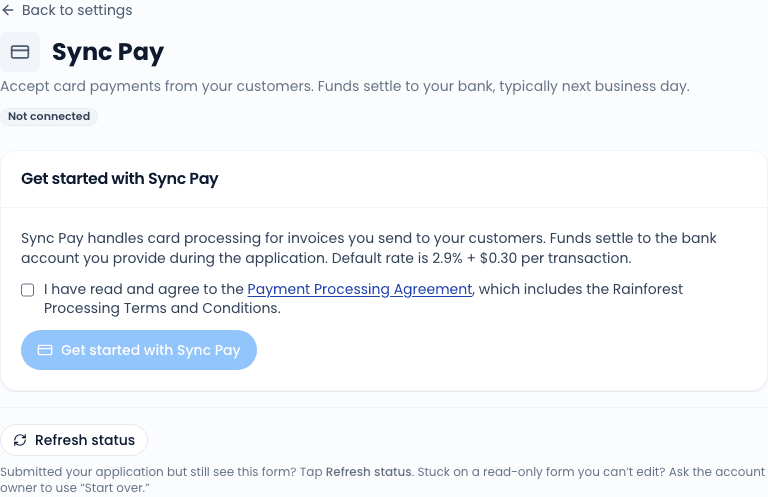
Click "Get started"
On the Settings -> Sync Pay page. The button opens an embedded Rainforest merchant application form right inside the CRM - you do not leave the page.
Fill in the merchant application
Rainforest collects standard KYB (Know Your Business) information: legal entity, EIN, beneficial owners, business address, bank account for deposits, expected transaction volume. The form is run by Rainforest, not by us; submissions go directly to them.
Wait for KYB review
Approval typically takes 1-3 business days. The settings page shows your current status as a live read from Rainforest:
- Not started - you have not yet submitted.
- In review - submitted and awaiting decision.
- Approved - good to go.
- Needs info - Rainforest needs additional documents or clarification. Click the page's resume button to continue.
- Rejected - rare; usually the result of EIN mismatches or unsupported business types. Contact support if this happens.
Once approved
The page changes shape after KYB is approved. You see:
- Current month volume - dollars processed this calendar month.
- Pending deposits - charges captured but not yet settled to your bank.
- Recent settlements - last 30 days of deposits to your bank account.
- Chargebacks - any open chargebacks with deadlines for evidence upload.
Pay-by-link
Once approved, every invoice's public link auto-displays a Pay now button. The customer enters their card on a Rainforest-hosted component embedded in the page (PCI scope stays with Rainforest, not us, not you).
Save card on file
When a customer pays an invoice, they get a "Save this card for future visits?" checkbox. If they check it, the card is tokenized and saved against their customer record. Future WOs can then charge the saved card automatically when completed (with the auto-charge setting on - see below).
Customers can also save a card without paying an invoice, via the standalone /save-card/<token> link you can generate from any customer page.
Auto-charge on WO completion
Per-customer toggle: when a WO completes for a customer with a saved card and Auto-charge enabled, the system charges the card for the invoice total automatically. Useful for fleet accounts on net-30 terms where the fleet has authorized auto-charge in their service agreement.
Fees
Rainforest's processing fees are passed through. Current rates (subject to change - see your Rainforest dashboard for live numbers):
| Method | Rate |
|---|---|
| Card present (tap/dip) | ~2.4% + $0.10 |
| Card not present (online, saved) | ~2.9% + $0.30 |
| ACH | ~0.8% (capped) |
We do not mark up Rainforest's fees. The Mobile Service Sync subscription is what you pay us; processing fees are passed through at cost.
Chargebacks
If a customer disputes a charge through their bank, Rainforest notifies us and the CRM surfaces the chargeback on the Sync Pay settings page and the dedicated Disputes sub-page at /settings/mss-pay/disputes. You have a deadline (usually 7-10 business days) to upload evidence: signed work authorization, before/after photos from inspections, the completed inspection PDF, communication records.
Click the chargeback row to open the evidence form. Upload files and write a short narrative. Submit. Rainforest forwards the evidence to the card networks and reports back when the dispute resolves.
Releasing the connection
Disconnecting Sync Pay is rare. The button is on the page but requires typing your shop name to confirm. After disconnect:
- Existing saved cards stop being chargeable.
- Existing pay-by-link buttons stop accepting new payments.
- Historical payment records stay intact.
Re-connecting later starts a fresh KYB review.
Related
- Settings overview
- Subscription Billing - the other billing relationship
- How invoicing works - where Sync Pay shows up in the invoice flow