Branding
Settings -> Branding controls how your shop appears on customer-facing surfaces - the booking widget, public quote pages, fleet portal, customer emails, and the invoice PDF. Configure your logo, primary color, and accent color once, and they propagate everywhere.
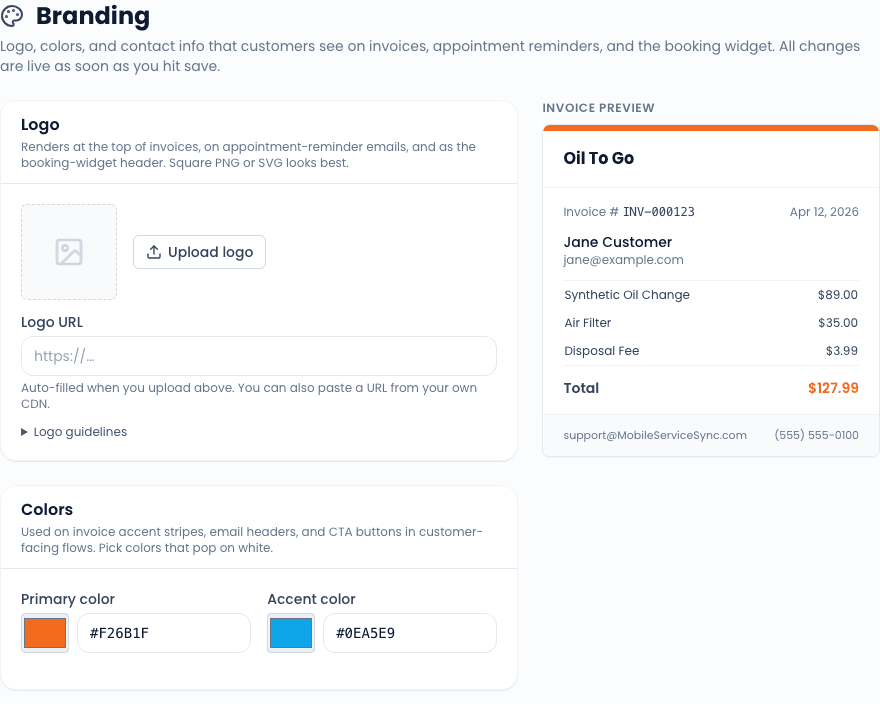
Logo
Upload a PNG, JPG, or SVG. Recommended dimensions:
- PNG / JPG - 600x180px or larger, transparent background ideal.
- SVG - any size; renders sharp at any zoom level. Strongly preferred when available.
The logo appears in:
- The top of the booking widget.
- The top of the public quote and invoice pages.
- The top of the fleet portal.
- Customer-facing emails (appointment confirmation, quote sent, review request, etc.).
- The invoice PDF header.
If you do not upload a logo, surfaces fall back to your business name as plain text.
Logos are stored on Vercel Blob storage. If your installation does not have a BLOB_READ_WRITE_TOKEN configured, the page shows a banner explaining that uploads are disabled. You can still set colors without a logo.
Colors
Two colors:
- Primary color - the dominant brand color. Used for button backgrounds, link hover states, and the header accent on customer-facing pages.
- Accent color - a complementary color used for secondary elements (badges, hover effects, etc.). Optional; if left blank, derived automatically from the primary.
Pick colors with reasonable contrast against white. The live preview on the right side of the page shows how each color looks on the booking widget header, a primary button, and a quote summary card. Use it before saving.
Live preview
The right side of the settings page shows a miniature rendering of:
- The booking widget header with your logo and primary color.
- A primary button in your primary color.
- A quote summary card showing how customer-facing pages will look.
Edits in the form re-render the preview on each keystroke (debounced), so you can dial in the colors without having to save and reload another page.
What is not branded
Some surfaces are intentionally not branded:
- The CRM itself (the desktop UI your team uses) - this stays in the Mobile Service Sync chrome.
- System emails (password resets, security alerts) - these are sent in Clerk's chrome for compliance.
- The mobile app - the tech-facing app is Mobile Service Sync branded.
Related
- Settings overview
- Booking widget - where the logo is most visible to customers
- Fleet portal - branded login and request flow