Subscription Billing
Settings -> Billing is where you manage your subscription to Mobile Service Sync. This is separate from Sync Pay, which is the payment processor you use to charge your customers - those are two different billing relationships.
Access to the page is permission-gated: viewing requires BILLING_READ; making changes (picking a plan, opening the Stripe portal) requires BILLING_WRITE. By default, only the Owner and Admin roles have these.
Plans
Mobile Service Sync has three plans. Prices below are the standard published rates; annual billing takes 20% off the base price (extra seats are not discounted).
| Core | Growth | Pro | |
|---|---|---|---|
| Monthly | $49/mo | $175/mo | $299/mo |
| Annual (per month) | $39/mo | $140/mo | $239/mo |
| Users included | 1 (hard cap) | 2 | 5 |
| Extra seats | Not available | $29/mo each | $29/mo each |
| Jobs per month | 20 | Unlimited | Unlimited |
| Customer & fleet portals | - | Included | Included |
| Fleet Sales pipeline | - | - | Included |
| SMS included | 1,000/mo | 5,000/mo | 10,000/mo |
Every plan includes the essentials: unlimited customers and vehicles, scheduling and routing, the tech mobile app, online booking, invoicing, review requests, and the plate/VIN decoder.
The Core caps
Core is priced for a one-person operation, so two hard caps apply:
- 1 user - you cannot invite teammates on Core. Upgrade to Growth to add seats.
- 20 jobs per month - once you hit 20 work orders in a calendar month, a banner appears and new job creation is blocked until the next month (or until you upgrade). There is no overage billing on Core; the cap is a hard stop.
What happens with gated features
Features your plan does not include still show in the app, but open a short pitch page describing the feature with an upgrade path instead of the feature itself. For example, a Core org opening Fleet Sales sees the "Pro feature" pitch page rather than the pipeline board.
The free trial
New accounts start on a two-week free trial with no payment method required. During the trial everything is unlocked so you can evaluate the full product.
Two things to know:
- Sync Pay is not part of the trial. Charging customers through Sync Pay requires an active, paid subscription - see Sync Pay.
- When the trial ends without a plan picked, the account flips to read-only until you subscribe. Nothing is deleted.
Trial reminders go out 5 days and 1 day before the trial ends.
What you see on the page
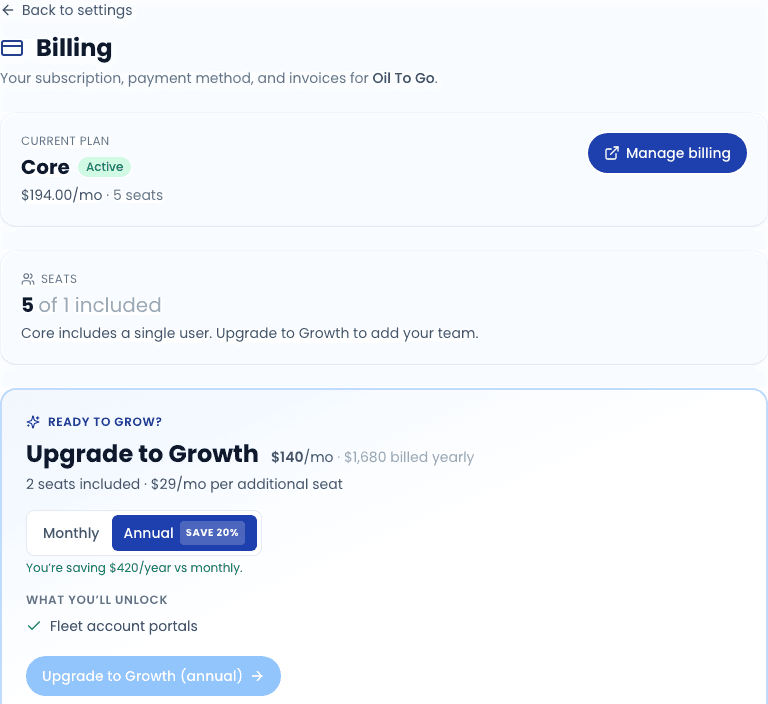
The Billing page shows:
- Current plan - Core, Growth, or Pro, with a status badge.
- Status - one of: trialing, active, past_due, canceled (see below).
- Trial countdown - when your status is
trialing, how many days remain. - Plan cards - the three plans side by side with price, included seats, per-seat rate, and feature list. Your current plan's button reads Current; the others read Pick Core / Growth / Pro.
- Manage billing - opens the Stripe Customer Portal once you have an active or past-due subscription.
Status meanings
| Status | What it means | What you can do |
|---|---|---|
| trialing | You are on the free trial. All features are unlocked. | Pick a plan to convert before the trial ends. |
| active | You have a paid subscription in good standing. | Manage payment method, change plan, or cancel via Stripe portal. |
| past_due | A payment failed and we have not been able to charge again. | Update your payment method via the portal. Some features get throttled if you stay past_due. |
| canceled | Your subscription is canceled. | The account stays read-only until you re-subscribe. |
A subscription that has been canceled keeps your data intact - you can resubscribe and pick up where you left off. We do not delete anything.
Picking or changing a plan
Click "Pick Core / Growth / Pro"
The button opens Stripe Checkout in a new tab.
Complete checkout on Stripe
Stripe handles the payment method capture, card validation, and tax. You never enter card numbers into Mobile Service Sync directly. Choose monthly or annual billing at checkout.
Return to the CRM
When Stripe confirms the payment, a webhook updates your subscription status. The Billing page reflects the new plan on next load.
Plan changes bill immediately - upgrading mid-cycle charges the prorated difference right away rather than waiting for the next invoice.
Managing payment method, invoices, and cancellation
The Manage billing button opens the Stripe Customer Portal, which is the canonical place for:
- Updating your payment method.
- Viewing and downloading invoice history.
- Changing the billing email.
- Canceling the subscription.
Cancellations take effect at the end of the current billing period - you keep access for the time you have already paid for.
Related
- Settings overview
- Sync Pay - the other billing relationship (charging your customers)