SMS Settings
Settings -> SMS is the hub for everything related to texting customers. Bind your office number, register for A2P 10DLC (required by US carriers for business texting), and manage SMS-related defaults.
This page is gated to users with the SMS_ADMIN permission - Owner, Admin, and Office Manager have it by default; Technicians do not.
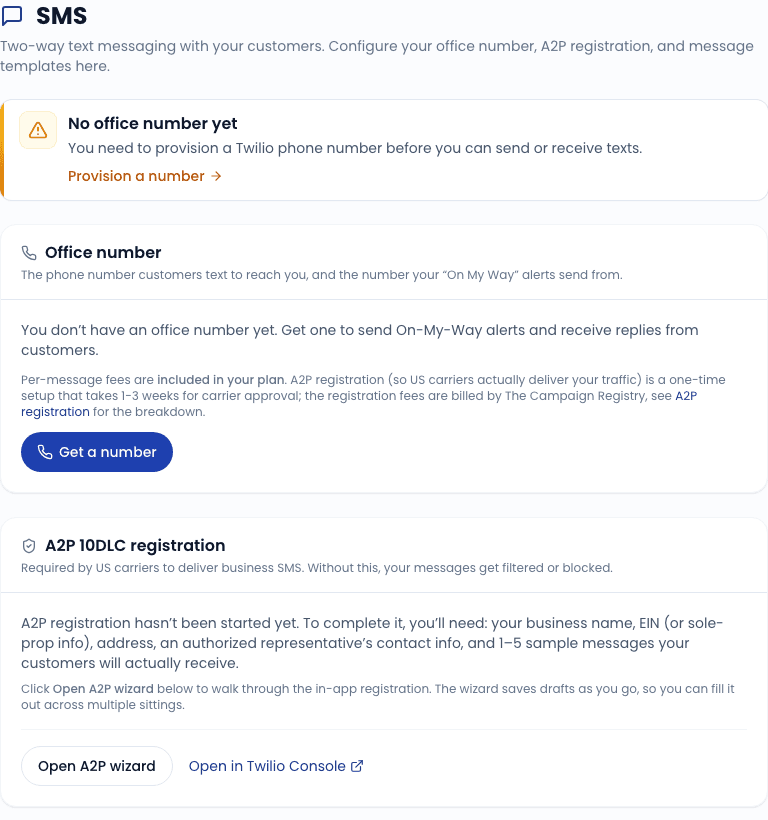
Office number
The office number is the phone number every outbound text from your shop sends from, and every inbound text routes to. It is provisioned through Twilio (our SMS provider).
If you have not bound a number yet, the page shows a Provision a number button that opens the provisioning wizard. The wizard:
- Asks for your preferred area code.
- Searches Twilio's inventory for available numbers.
- Lets you pick from the candidates.
- Provisions the number and binds it to your tenant.
Once bound, the number appears on the page with a delete/release button (rarely used - releasing a number means you lose the conversation history attached to it).
A2P 10DLC registration
A2P 10DLC ("Application-to-Person, 10-digit Long-Code") is the US carriers' registration system for business texting. Without an approved A2P registration, your outbound texts get heavily throttled or blocked by major carriers - especially T-Mobile and AT&T.
The settings page shows your current A2P status as a live read from Twilio (not a cached value), so you see real-time campaign state.
Status meanings
| Status | What it means |
|---|---|
| Not started | You have not begun the registration. Click Start registration to open the wizard. |
| In review | Submitted. Twilio and the carriers are reviewing. Usually 1-3 business days. |
| Approved | You are good. Outbound texts flow at full throughput. |
| Rejected | Carriers rejected the registration. The rejection reason is shown; common causes: missing opt-in language, brand mismatch, EIN issues. Fix the issue and re-submit. |
What you need
The registration wizard collects:
- Brand details - business legal name, EIN, address, website, social media URLs.
- Campaign details - what kind of messages you send (customer service, appointment reminders, marketing), example message templates, opt-in flow description.
- Volume - estimated daily message count. Be honest; over-estimating raises throughput limits but slightly higher fees.
The wizard saves your progress; you can come back later if you do not have everything in one sitting.
Costs
Twilio charges a one-time brand vetting fee and a small monthly campaign fee. The current rates are shown in the wizard before you submit. We pass these through at cost.
Templates
A quick link from this page goes to the SMS templates editor. Templates are used by:
- Appointment and service-due reminders
- Review requests
- Fleet sales SMS step (gated by lead opt-in)
You can preview and edit templates from those individual feature pages, or from the central templates editor reachable here.
Daily usage sync
A cron job runs daily to push SMS usage counts back from Twilio so the dashboard can show "X texts sent this billing period". The sync runs at 2am tenant local time. If usage numbers look stale on the dashboard, the sync probably failed last night; this is rare and self-recovers on the next run.
Diagnostics
If outbound texts are failing, the page links to an SMS diagnostic tool that walks through the common causes:
- A2P status not approved.
- Customer has not opted in.
- Customer has texted STOP.
- Twilio credentials misconfigured.
- Phone number released.
Run it before contacting support - 90% of "texts are not sending" tickets resolve from the diagnostic output.
Related
- Settings overview
- SMS Inbox - the conversation view for inbound texts
- Reminders - automated reminder templates
- Reviews - review-request templates