Review Requests
Settings -> Reviews controls the automated review-request program. After a job wraps up (you pick the exact trigger), the system texts the customer asking for a review on Google, Facebook, or any other URL you configure.
This page is the only place to configure the program. Sends are dispatched automatically once a job hits your chosen trigger plus the configured delay.
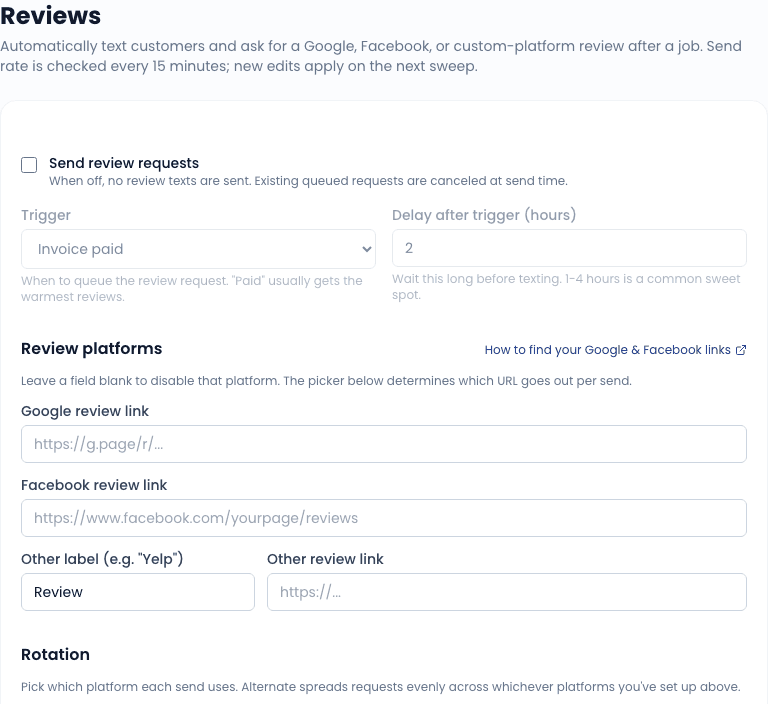
What you configure
Platform URLs
Three slots:
- Google review link - your Google Business Profile review link (looks like
https://g.page/r/.../review). - Facebook review link - your Facebook page's review section.
- Other - a custom label plus URL for anywhere else (Yelp, BBB, an internal feedback form).
Not sure where to get these? See Find Your Review Links. The customer is routed to one platform per send, per the rotation setting below.
Trigger
Pick when the request fires:
- Service marked complete - fires when the WO is marked complete, regardless of payment status. Useful for fleet accounts where payment is on terms and you do not want to wait.
- Invoice issued - fires when the invoice goes out.
- Invoice paid - fires once the invoice is marked paid. The most common choice; ensures the customer had a complete experience.
A delay field (in hours) pushes the send out after the trigger, and Skip if asked within (days) stops you from re-asking a customer you asked recently.
Rotation
When you have more than one platform configured, the rotation setting picks one per send:
- Alternate evenly - spreads sends across every configured platform in order.
- Google only - always send the Google link.
- Facebook only - always send the Facebook link.
- Other only - always send the Other link.
The settings page shows which platform the next send will use when alternating.
SMS body
The SMS template uses these placeholders:
| Placeholder | Resolves to |
|---|---|
{{customerFirstName}} | First name only (e.g., Casey) |
{{customerName}} | Full customer name |
{{orgName}} | Your shop's name |
{{reviewUrl}} | The platform link picked by rotation |
{{platformLabel}} | Human label for the picked platform (Google, Facebook, ...) |
Default body:
Hi {{customerFirstName}}, thanks for choosing {{orgName}}! If we did good
work, would you mind leaving a quick review? It really helps small
businesses like ours: {{reviewUrl}}. Reply STOP to opt out.
Edit to match your voice. Keep it short - SMS segments cost money and customers ignore long ones. You can also attach an image URL to send the request as an MMS with a picture.
The customer's experience
The text lands a configurable delay after the trigger - enough time to leave the driveway and check the wallet, not so long they forget the visit.
Review requests are SMS-only and respect consent: a customer with no phone on file, no SMS opt-in, or an SMS opt-out is skipped silently.
The link goes to your configured review URL. There is no intermediate "rate us 1-5 stars" page - we send them straight to the public review platform. (Gating the request behind a private rating is against Google's review policy.)
Skipping customers
Three things stop a request from going out:
- Repeat-customer dedupe - the Skip if asked within (days) setting. A customer who already got a request inside that window is skipped. 60 to 90 days is common; 0 disables dedupe.
- Per-customer opt-out - flip Review requests off on an individual customer's record for difficult clients or damage control after a bad visit.
- SMS consent - no opt-in (or an explicit STOP) means no request.
Related
- Settings overview
- Reminders - the other automated outreach programs
- SMS settings - SMS infrastructure