Service Types
Settings -> Service Types is where you define the catalog of jobs you sell. The catalog feeds the booking widget, the work-order line builder, the quote line builder, and the invoice line items.
Service types come in three kinds, each on its own tab:
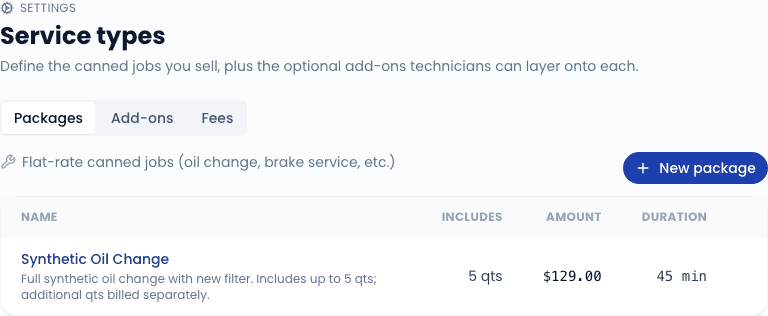
| Kind | Used for |
|---|---|
| Packages | Flat-rate canned jobs - "Full Synthetic Oil Change", "Brake Service", "Cabin & Engine Air Filter Combo". The main thing customers book. |
| Add-ons | Optional extras layered onto a package - "Air Filter Replacement", "Wiper Blades", "TPMS Reset". |
| Fees | Standard fees that appear on most invoices - "Shop Fee", "Hazardous Waste Disposal", "After-hours Surcharge". |
Packages
A package is your primary sellable service. Each package has:
- Name - what the customer sees on the booking widget and the invoice.
- Description - optional longer copy shown on the booking widget detail view.
- Default price - what you charge before tax. Can be overridden on a per-work-order basis.
- Default duration - how long the job typically takes; used by the schedule to estimate slots.
- Included oil quarts (oil-change packages) - quart count that the package covers. Affects PartsTech lookups when building a quote.
- Active - toggle off to hide from the booking widget while keeping historical references intact.
- Color - optional per-package color used for the schedule chip.
Packages drive the booking widget's service picker. If a package is active and the customer's vehicle is in scope (no service-area or vehicle-spec restrictions block it), it appears as a tile in the widget.
Add-ons
Add-ons are optional line items the customer can pick on top of a package. They render as checkboxes on the booking widget under the chosen package.
Each add-on has:
- Name and description (same as packages).
- Labor cost - the labor portion of the price.
- Parts markup percentage - applied to the parts price (which we look up from PartsTech when available; falls back to a manual default you set).
- Active flag (same as packages).
The add-on's customer-facing price is labor + (parts_price * (1 + markup/100)). The breakdown is shown to the customer on the booking widget so they understand what they are paying for.
Fees
Fees are flat charges that you add to invoices regularly. They are not chosen by customers on the booking widget - operators add them when building the WO or invoice.
Each fee has:
- Name - what shows up on the invoice line.
- Amount - flat dollar value.
- Auto-add flag - if on, this fee is added by default to every new work order. Operators can still remove it per-WO.
- Active flag (same as the other kinds).
Common fees: shop fees ($5-10 covering misc consumables), hazardous waste disposal, after-hours surcharge, mobile service fee for far-out addresses.
Active vs. inactive
You cannot delete a service type that has been used on any historical work order, invoice, or quote - that would break references. Instead, toggle it inactive. Inactive service types:
- Are hidden from the booking widget.
- Are hidden from the line search in new quotes and work orders.
- Stay attached to historical records (the line item still shows their name and price as it was at the time).
- Stay visible in this settings list (under the "Inactive" filter) so you can re-activate.
Tips
- Keep your catalog small - fewer, well-named packages outperform a sprawling list. Aim for 5-10 packages, not 50.
- Use descriptions - the booking widget shows the description in a hover/tap detail view. Use it to explain what is included and call out anything that is not.
- Update prices in one place - changing a package's default price changes what the booking widget quotes for future bookings. Historical WOs and invoices are unaffected.
Related
- Settings overview
- Creating a work order - how service types appear in the WO line builder
- Creating a quote - same line builder, used on the quote side