Reminders
Settings -> Reminders controls two automated outreach programs:
- Service-due reminders - sent when a vehicle is approaching its next projected service interval ("Your oil change is due in 2 weeks").
- Appointment reminders - sent the day before a scheduled visit, optionally with a one-click confirm link.
Both run as nightly cron jobs. Both respect SMS opt-in - texts only fire when the customer has explicitly opted in.
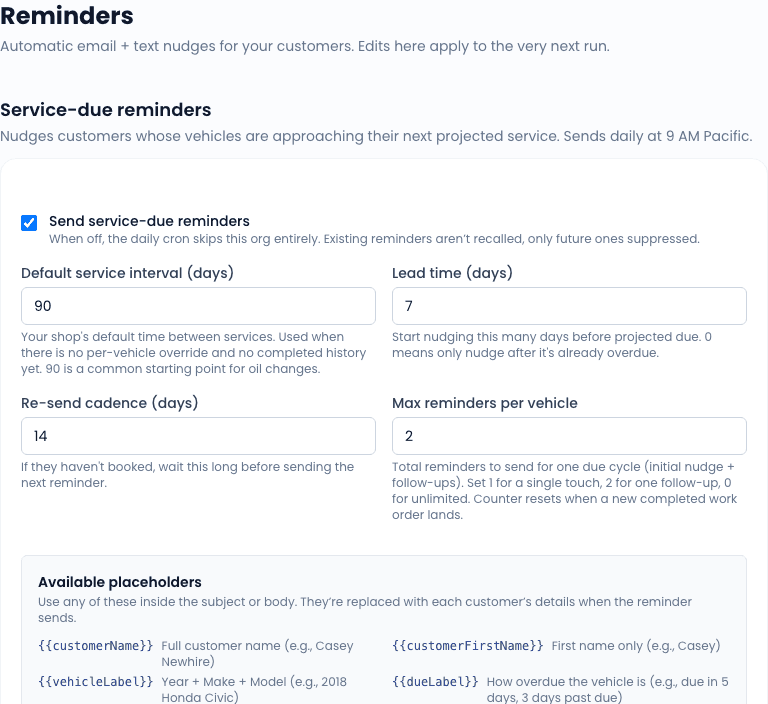
Service-due reminders
The service-due reminder predicts when a vehicle is next due for service based on the work history (last service date and mileage) and the configured service interval (miles and/or days) on the vehicle or fleet.
How the prediction works
For each vehicle, the system tracks:
- The date and mileage of the last service.
- The next-due date and mileage, computed as:
last_service + interval_milesandlast_service_date + interval_days.
A reminder fires when the vehicle is within the reminder lead time of either threshold (whichever comes first). Default lead time is 14 days; configurable per-tenant.
What gets sent
The reminder is an SMS by default (and an email when no phone is on file). The body is a template you control on this settings page with these substitution tokens:
| Token | Resolves to |
|---|---|
{CUSTOMER_NAME} | Customer's first name |
{VEHICLE} | Year + make + model (e.g. "2022 Ford F-150") |
{DUE_DATE} | Projected due date (formatted) |
{SHOP_NAME} | Your business name |
{BOOKING_LINK} | A pre-filled link to your booking widget with the customer and vehicle baked in |
Disabling per customer
You can suppress reminders for an individual customer (or vehicle) by toggling the No automated reminders flag on the customer or vehicle detail page. Fleet accounts with their own contact preferences override this default.
Appointment reminders
The appointment reminder fires the day before a scheduled visit. It is meant to cut no-shows.
How it picks recipients
The nightly job scans for work orders scheduled for the next day. For each WO with a customer who has SMS opt-in (or an email on file), it queues a reminder.
What gets sent
The body is templated with these tokens:
| Token | Resolves to |
|---|---|
{CUSTOMER_NAME} | Customer's first name |
{DATE} | Tomorrow's date (formatted) |
{TIME} | Scheduled window |
{TECH_NAME} | Assigned tech's first name |
{ADDRESS} | Service address summary |
{CONFIRM_LINK} | One-click confirm link (see below) |
{SHOP_NAME} | Your business name |
{SHOP_PHONE} | Your office phone |
The confirm link
When Include confirm link is on, the reminder includes a tokenized URL that the customer can click to confirm the appointment. Confirming flips a flag on the WO that shows up in the schedule view as a "Confirmed" badge. This is useful for fleet accounts where the dispatcher needs to know who actually intends to show up vs. who is still TBD.
The confirm link does not require the customer to log in. The token is one-shot - clicking it confirms; clicking again is a no-op.
Both: SMS opt-in requirement
Both reminder programs respect Customer.smsOptInAt. A customer without opt-in gets an email fallback (when an email is on file) and skipped silently otherwise.
The opt-in status is captured on the customer record (Customer page -> SMS opt-in checkbox). For new customers from the booking widget, the SMS-opt-in checkbox on the widget feeds this directly.
Cron timing
The cron jobs run nightly around 8pm local to your shop time zone (configured in Settings -> Shop). Tweaking this is not exposed in the UI; if you need a different time, contact support.
Related
- Settings overview
- SMS settings - SMS infrastructure and A2P
- Reviews - the third automated outreach program (review requests)