Notification Preferences
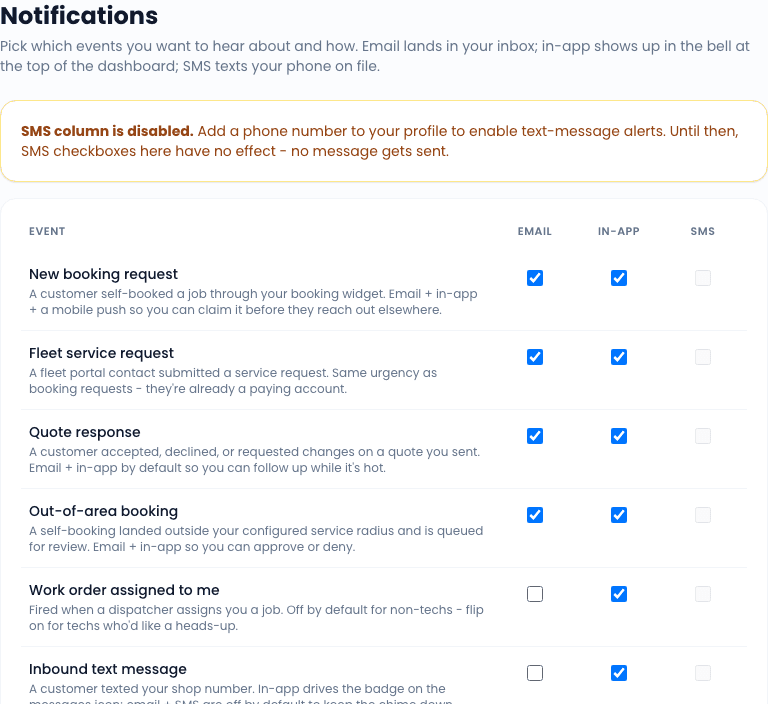
Settings -> Notifications is a per-user preferences page. Each user controls which event types ping them and on which channels. There is no organization-wide override; each user opts in or out for themselves.
How it works
The page lists every notification event the system can fire, with three checkboxes per row:
| Channel | What it does |
|---|---|
| In-app | Drops a row into the bell-icon dropdown and the personal notifications feed. |
| Sends an email to the user's email address on file. | |
| SMS | Texts the user's phone on file. Requires a phone number. |
Toggle individually. Saved on every change (no "Save" button - changes apply immediately).
Events you can subscribe to
The exact list evolves as new events ship; the current set includes:
- New booking - a customer booked a job via the widget.
- Fleet request - a fleet manager submitted a service request via the portal.
- Out-of-area booking - a booking landed that fell outside your service area; needs operator review.
- Work order assigned to me - a teammate assigned a WO to you.
- Inbound SMS - a customer texted your office number.
- A2P state change - your SMS A2P registration moved status (approved, rejected, etc.).
- Service-due reminder fired - one of your reminder runs sent.
- Trial status - trial reminders (5 days out, 1 day out).
- Subscription billing - billing events (payment failed, plan changed).
- Fleet sales - cadence step due, lead score change, lead converted.
SMS column gotcha
The SMS column is auto-disabled with an inline hint when the user has no phone number on file - the channel cannot fire regardless of the toggle state. To enable SMS notifications, add a phone number to the user's profile first.
Defaults for new users
When you invite a new teammate, they land with sensible defaults: in-app on for everything, email on for high-signal events (assignments, fleet requests, A2P state changes, billing), SMS off across the board. Users tune from there.
Related
- Settings overview
- SMS Inbox - one of the channels that drives notifications
- SMS settings - SMS infrastructure for the SMS channel to work